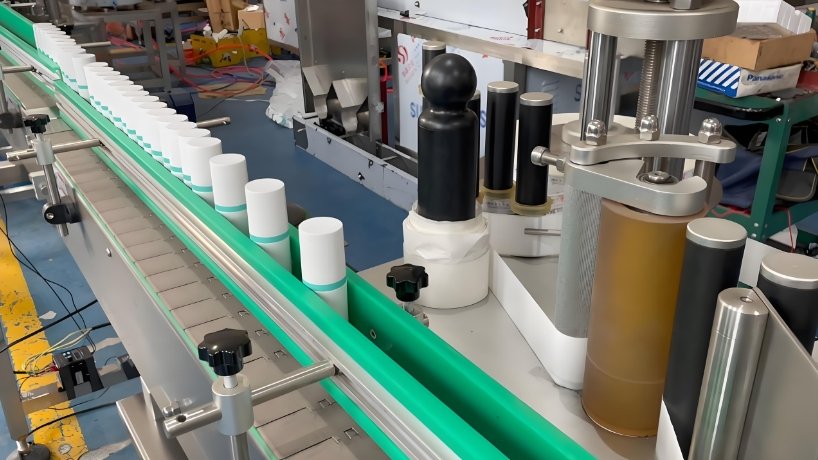
A labeling machine must apply every label in the correct position, at the correct speed and without wrinkles, bubbles or application errors. When the machine begins skipping labels, placing them unevenly or stopping unexpectedly, the resulting downtime can reduce output and increase material waste.
This labelling machine troubleshooting guide explains the most common labeling errors, their likely causes and the practical adjustments operators can make. It covers automatic and semi-automatic systems used for bottles, jars, cartons, trays and other containers.
Before performing maintenance or removing guards, stop the machine, isolate its power source and follow the manufacturer’s safety procedure. Electrical, PLC, motor and internal mechanical repairs should only be handled by trained personnel.
Businesses experiencing repeated application problems can also review the available labeling machine solutions for different bottle shapes, label positions and production requirements.
Quick Labeling Machine Troubleshooting Checklist
Before changing major settings, inspect these basic areas:
Confirm that the label roll is loaded in the correct direction.
Check that the label web follows the proper threading path.
Remove adhesive, dust and label fragments from sensors and rollers.
Confirm that the container guides are centred and secure.
Check label roll tension and backing-paper tension.
Verify that the product sensor and label-gap sensor are calibrated.
Compare conveyor speed with label dispensing speed.
Run several test containers before restarting full production.
Change only one setting at a time. Making several adjustments together makes it difficult to identify the actual cause of the problem.
1. Labels Are Not Dispensing Correctly
A labeling machine may fail to release labels, feed them irregularly or stop the label web during production.
Possible causes
The label roll is installed incorrectly.
The backing paper is not threaded around the drive roller correctly.
The label sensor cannot detect the gap between labels.
Adhesive residue has accumulated on the peeling plate.
The drive roller is worn or slipping.
Label roll tension is too high or too low.
How to fix it
First, reload the label roll according to the machine diagram. Make sure the backing paper passes through every required roller and tension arm.
Clean the label-gap sensor and peeling plate using a material approved by the manufacturer. Recalibrate the sensor using an unused section of the label roll and run the machine at a low speed.
If the drive roller turns but the label web does not move consistently, inspect it for wear, contamination or insufficient pressure.
2. Frequent Label Jams in Roll-Fed Labelers
Frequent label jams in roll-fed labelers usually occur when the label web cannot move smoothly through the dispensing system.
Common causes
Uneven label-roll edges
Excessive web tension
Damaged or curled backing paper
Adhesive leaking from label edges
Incorrect roller alignment
Label fragments around the peeling plate
Sudden changes in operating speed
Solution
Stop the machine and carefully remove the jammed material without using sharp tools near rollers or sensors. Inspect the label roll for damaged edges, loose winding or exposed adhesive.
Reload the roll and reduce the tension slightly. Confirm that every guide roller is parallel and that the label web remains centred throughout the feed path.
Restart the machine at a low speed. Increase the speed gradually while observing the web. If jams return at higher speeds, the dispensing speed, conveyor speed and tension settings may not be synchronized.
3. Label Misalignment in Automatic Labeling Machines
Label misalignment occurs when labels are applied too high, too low, off-centre or at an angle. It may affect only a few containers or every product on the line.
Possible causes
Containers are entering the machine inconsistently.
Side guides are loose or incorrectly positioned.
The product sensor activates too early or too late.
Label dispensing is not synchronized with conveyor movement.
Bottles rotate or lean during application.
The labeling head is not level.
Product shapes or sizes vary between batches.
How to adjust the machine for incorrect labeling
Place an empty container on the conveyor and centre the side guides around it. The guides should control the container without creating excessive friction.
Check the product sensor and ensure it detects the same point on every container. Adjust the label-delay setting in small increments until the leading edge of the label reaches the correct position.
Inspect the labeling head vertically and horizontally. Tighten loose supports only after confirming the correct position.
For curved containers, ensure that the bottle remains stable while rotating. Businesses labeling cylindrical wine, beverage, cosmetic or pharmaceutical bottles may require a correctly configured round bottle labeling machine to maintain consistent wraparound placement.
Run at least five test containers after each adjustment. Do not approve the setting based on a single correctly labeled bottle.
4. Labels Are Not Sticking Properly
Poor adhesion can cause labels to lift at the edges, slide after application or fall off during storage and transportation.
Possible causes
The container surface is dusty, wet or oily.
The bottle temperature is unsuitable for the adhesive.
The label material is incompatible with the container.
Application pressure is too low.
The pressure roller is worn or incorrectly positioned.
Labels were stored in excessive heat, cold or humidity.
Solution
Clean and dry the container surface before labeling. Confirm that the selected adhesive is suitable for the container material, product environment and storage conditions.
Increase pressure gradually rather than applying maximum force immediately. Inspect the pressure roller for uneven wear and confirm that it contacts the complete label surface.
If one label is being applied to a flat or shaped container, a properly adjusted single-side labeling machine can help maintain uniform pressure and position.
5. Labels Are Wrinkled or Bubbling
Wrinkles and bubbles commonly appear when the label reaches the container unevenly or when air becomes trapped during application.
Likely causes
Label dispensing speed is too high.
The bottle rotates unevenly.
The pressure roller is not aligned.
The label is too large for the container’s curved surface.
Web tension is inconsistent.
The container surface is tapered, flexible or irregular.
Solution
Reduce the machine speed and observe where the first wrinkle develops. If it starts at the leading edge, check label timing and initial contact. If it develops across the middle, inspect pressure and bottle rotation.
Adjust the pressure roller so that it applies the label progressively rather than pressing the complete label onto the container at once.
For transparent labels, clean the application area carefully because even minor dust or moisture can become visible underneath the label.
6. The Machine Skips Labels or Applies Two Labels
Skipped or double labels are usually connected to incorrect sensor calibration or inconsistent gaps on the label roll.
Possible causes
The label-gap sensor is dirty.
The sensor sensitivity is too high or too low.
Transparent labels require a compatible sensor.
Label gaps vary across the roll.
Static electricity interferes with label separation.
The backing paper slips on the drive roller.
Solution
Clean and recalibrate the label sensor using the actual production label. Check whether the sensor is designed for the label material being used.
Inspect several sections of the label roll for irregular gaps. If gaps vary significantly, test another roll before changing machine settings.
Clean the drive roller and verify that it grips the backing paper consistently. Where permitted by the manufacturer, use an appropriate anti-static solution or grounding method.
7. Front and Back Labels Do Not Line Up
Products requiring separate front and back labels can develop uneven spacing, different heights or incorrect orientation.
Possible causes
The two labeling heads have different delay settings.
Bottles are rotating between applications.
Container guides are not holding products consistently.
One label roll has different spacing or tension.
Conveyor speed changes during the labeling cycle.
Solution
Set both labeling heads using the same reference container. Adjust each label position separately, then test the complete application cycle.
Stabilize the product before it reaches the second labeling head. Verify that both rolls use the correct label dimensions and backing-paper specifications.
A two-side labeling machine is suitable when products require accurate front and back labels in one continuous process.
8. The Labeling Machine Stops or Will Not Power On
A complete labeling machine failure may be caused by a safety circuit, electrical connection, overloaded motor or sensor condition.
Initial checks
Confirm that the main power supply is available.
Check whether the emergency-stop button is activated.
Verify that guards and safety doors are closed.
Look for active fault codes on the control panel.
Check whether a jam has activated an overload or safety sensor.
Inspect accessible cables for loose connections or visible damage.
Reset the emergency stop only after confirming that the machine is safe to operate. If the control panel displays an error code, consult the manufacturer’s manual before resetting it.
Do not bypass safety switches. Persistent electrical faults, motor failures, PLC errors and damaged wiring require a qualified technician.
9. Labeling Speed Is Inconsistent
Inconsistent operating speed can create label gaps, poor placement and repeated production stops.
Possible causes
Conveyor speed and label dispensing speed are not matched.
The drive belt is loose or worn.
Containers are backing up before the labeling station.
Product sensors are detecting containers inconsistently.
Upstream filling or capping equipment is stopping unexpectedly.
Acceleration settings are too aggressive.
Solution
Observe the complete packaging line rather than the labeling machine alone. Confirm that bottles arrive at a consistent distance and speed.
Match the label dispensing rate to the conveyor speed. Check belts, rollers and transmission components for slipping or wear.
When labels must be applied above and below flat products, cartons or trays, consider whether a dedicated top-and-bottom labeling machine would provide better control than repeatedly modifying an unsuitable setup.
10. Red Wine Labeling Machine Problems and Solutions
Wine bottles can be difficult to label because glass surfaces may be cold, damp, tapered or slightly inconsistent between suppliers.
Common wine-bottle labeling problems
Front labels are not centred.
Back labels do not align with front labels.
Labels lift because condensation is present.
Wraparound labels develop bubbles.
Bottles rotate inconsistently.
The glass surface contains dust or residue.
Label adhesion changes in cold storage.
Solutions
Allow bottles to reach the temperature required by the label and adhesive supplier. Ensure the glass is clean and completely dry before application.
Adjust bottle-separation guides so that each bottle reaches the sensor individually. Check the rotation belt or roller for even contact with the glass.
Use several filled test bottles rather than relying only on empty bottles. Their weight can change stability and rotation during labeling.
For complete wine production lines, review how labeling connects with bottle filling and other packaging stages in this wine bottle filling machine guide.
Labeling Machine Operation Tips
Good operation practices prevent many labeling errors before they occur.
Use the correct label and backing-paper specifications.
Store label rolls in a clean, controlled environment.
Verify settings at the beginning of every production batch.
Use a saved recipe for each bottle and label combination where supported.
Start at a low speed after every product changeover.
Keep containers clean and dimensionally consistent.
Record successful sensor, delay, speed and tension settings.
Train operators to recognize early signs of misalignment and web damage.
Inspect the first labeled products after every machine restart.
Avoid changing multiple parameters at the same time.
A simple settings log can reduce future setup time. Record the container dimensions, label size, conveyor speed, sensor sensitivity, label delay and roller position for every successful production run.
Maintenance of Labeling Machines
Preventive maintenance reduces unplanned downtime and helps maintain accurate label placement.
Daily maintenance
Remove label fragments and backing-paper debris.
Clean sensors, rollers and the peeling plate.
Inspect the label path for adhesive buildup.
Check emergency stops and safety guards.
Verify label position before full production.
Weekly maintenance
Inspect belts, rollers and tension components.
Check guides and mounting brackets for looseness.
Inspect cables and sensor mounts.
Test multiple containers at normal production speed.
Clean areas that are difficult to reach during daily operation.
Monthly maintenance
Inspect bearings, motors and transmission components.
Check roller wear and replace damaged components.
Verify labeling-head alignment.
Review sensor calibration.
Inspect the conveyor for uneven movement.
Lubricate approved components according to the machine manual.
Do not apply lubricant near label paths, sensors or surfaces that could contaminate the product. The exact maintenance schedule should always follow the manufacturer’s instructions and actual operating conditions.
For sanitation procedures affecting the filling stage of the production line, follow the separate filling machine cleaning guide.
When Should You Replace or Upgrade a Labeling Machine?
Repair may be appropriate when the problem involves a replaceable sensor, roller, belt or setup issue. Replacement or upgrading may be more practical when:
The machine cannot handle the required production speed.
It is incompatible with new bottle or label formats.
Replacement parts are repeatedly unavailable.
Mechanical wear causes recurring placement errors.
Changeovers require excessive downtime.
The existing machine cannot integrate with the filling and capping line.
Repair costs continue increasing without reliable improvement.
The correct machine depends on the container shape, label material, label position, required speed and available production-line space.
For a recommendation, send your container photos, dimensions, label size, desired output and product type through the contact and quotation page.
Frequently Asked Questions
What are the most common labeling machine problems?
The most common problems include label jams, misalignment, poor adhesion, wrinkles, bubbles, skipped labels, double labels, sensor faults and inconsistent machine speed.
How do I adjust a labeling machine for incorrect labeling?
Centre the container guides, confirm product-sensor position, inspect the labeling-head alignment and change the label-delay setting in small increments. Test several containers after every adjustment.
What causes frequent label jams in roll-fed labelers?
Common causes include excessive web tension, damaged backing paper, adhesive buildup, misaligned rollers, uneven label rolls and sudden operating-speed changes.
Why are labels misaligned in automatic labeling machines?
Misalignment can result from unstable containers, loose guides, incorrect sensor timing, speed mismatch, uneven bottle rotation or a labeling head that is not level.
How often should a labeling machine be maintained?
Sensors and label-contact areas should normally be inspected and cleaned daily. Belts, rollers, guides and mounting components should receive more detailed weekly and monthly inspections according to the manufacturer’s maintenance schedule.
Why do labels wrinkle on bottles?
Wrinkles may occur because of excessive speed, poor bottle rotation, incorrect roller pressure, unstable web tension or a label size that does not suit the bottle shape.
When should I call a labeling machine technician?
Contact a trained technician for electrical faults, PLC errors, motor or gearbox failures, recurring safety-circuit faults and mechanical problems that require internal disassembly.
Final Thoughts
Effective labeling machine troubleshooting begins with a controlled inspection of the label roll, feed path, sensors, container guides, rollers and speed settings. Most application problems can be traced to incorrect setup, contamination, unsuitable materials or components that require maintenance.
Operators should adjust one parameter at a time, document successful settings and test several containers before restarting full production. When problems continue despite correct calibration and maintenance, technical repair or a machine better matched to the container and label may be required.